

Sports schedules are bananas. Take back control in the kitchen, at least.
I’m fortunate to have a partner who actively participates in meal planning, loves to cook and bake bread, and is a better chef than I am (no question). But the division of labor usually looks like this: I do the majority of the grocery shopping and prepare weeknight meals, while Mr. Good bakes sourdough and cooks gourmet meals on the weekends.
Even in our household, the "what's for dinner?" question is a constant. And with a growing athlete who needs nutritious fuel, it isn't a casual question.
So when it's 6:42 p.m., and practice ran long, and the only thing in the fridge is barely identifiable leftovers, hunger and panic can set in. The food in the freezer won’t defrost in time. The meal I was intending to cook is missing a key ingredient. So, for the umpteenth time this month, I buckle and order delivery, feeling guilt about the expense and the calories.
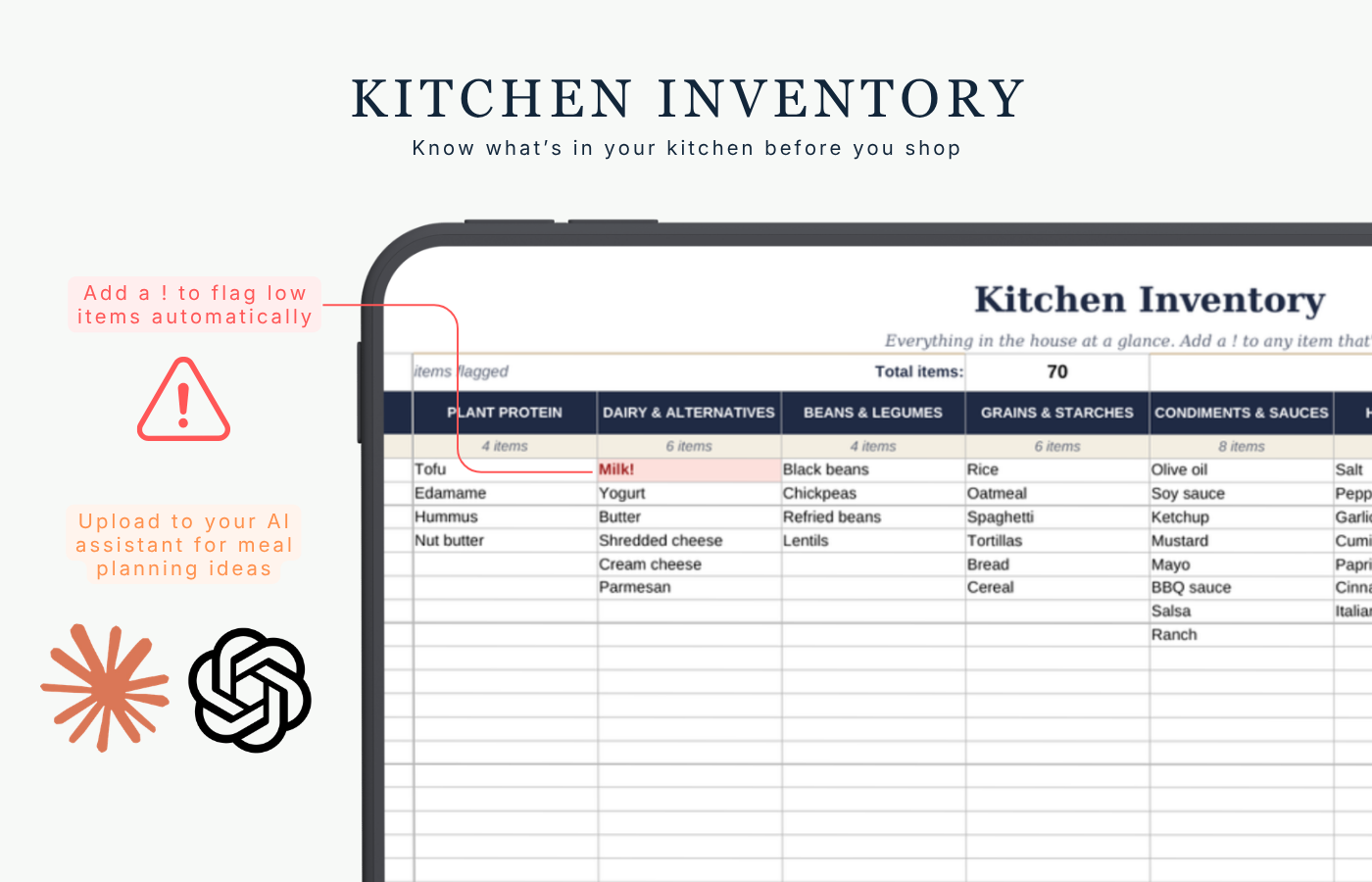
That’s why I made the Busy Sports Family Meal Planner Google spreadsheet. I’m not saying I have it all figured out, but I finally feel in control of what’s in our kitchen and what our meal options are.
With my Student-Athlete Weekly Planner, our family sets aside time on Sundays to plan and prepare for the week’s commitments, activities, and nutrition. Yes, meal planning is still a lot of work — deciding what to make and when, knowing which ingredients are in stock and what’s running low, predicting which meals will be scarfed down happily and which will garner an eye roll.
However, the more we use the spreadsheet, the better the data gets. I can track from week to week which recipes were hits, what was perfect for a busy night, and what meals were easy enough for my teen to make.
The pain points this solves
Dinner collides with the schedule. A meal plan that ignores practices and game nights is just a wish list. A 45-minute recipe on a night when you're out the door at 5:15 isn't realistic.
You don't know what's in the kitchen. You buy a third bottle of soy sauce, run out of eggs, and end up at the store twice in one weekend.
The "what can I eat?" loop. Teens are hungry at all hours, and they ask. Often. Whoever has the plan in their head becomes the family's walking menu.
Planning feels like another chore. If it takes an hour to set up, it won't survive past the second week.
How this planner is different
Most meal planners start with recipes. This one starts with your week.
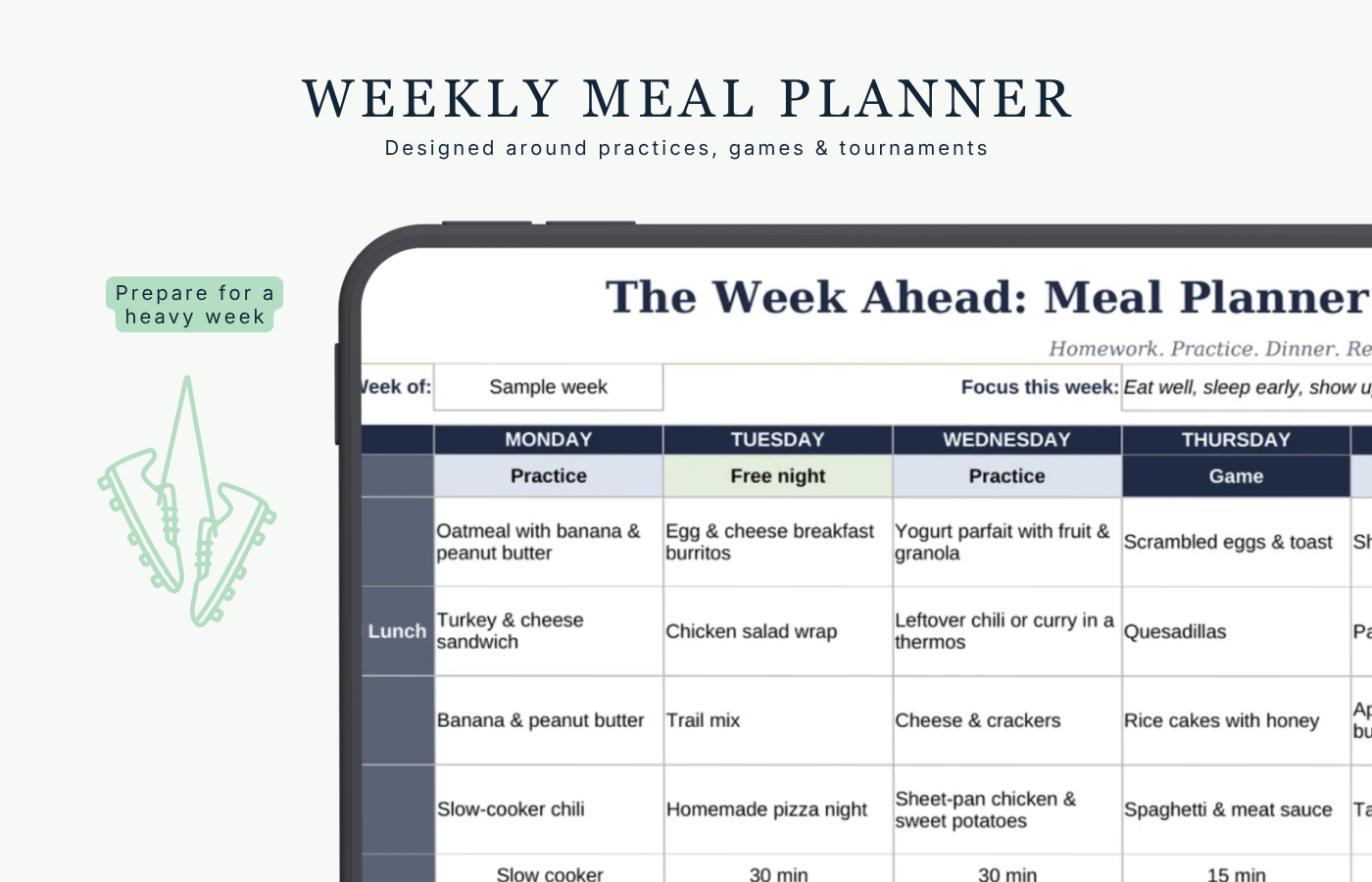
Day Type: For each day, pick Practice, Game, Tournament, Travel, or Free Night. The planner color-codes your week, and it tells you when it's a heavy one, so you know to line up slow-cooker, make-ahead, or leftover dinners.
Dinner Effort: Tag each dinner with how much effort it needs: 15 min, 30 min, slow cooker, make-ahead, leftovers, dine out, or delivery/takeout. On game night, takeout isn't a failure. It's a plan.
A real kitchen inventory: Track your pantry, fridge, and freezer across 12 categories. Add a "!" to anything running low. It turns red and lands on your grocery list automatically.
Meal ideas and recipes: Build your family's go-to list, then pick from dropdown menus when you plan. There's also a recipe index and a printable recipe card for each favorite.
An Athlete Fuel Guide: Simple ideas for pre-practice snacks, after-practice food, and tournament-day coolers. These are general ideas, not nutrition advice.
Customizable, not one-size-fits-all
You're not stuck with someone else's meal plan. Every dropdown, list, and category is yours to change. Swap in your family's preferences, rename sections, add rows, and duplicate the recipe card for every new recipe. If your tournament weekends need their own system, build it.
Bonus: Let an AI assistant do the brainstorming
You don't need an AI assistant to use the planner, but if you already have one (ChatGPT, Claude, Gemini, etc.), it can take a lot of the thinking off your plate. Copy and paste your Kitchen Inventory or Weekly Plan into the chat, then try these prompts:
Dinner ideas from what you have
"Here's what's in my kitchen: [paste your Kitchen Inventory]. Suggest 5 dinners I can make in 30 minutes or less. Mark which ones a teenager could make on their own."
Plan the week around the schedule
"I have practice on Monday, Wednesday, and Friday, a game on Thursday, and a tournament on Saturday. Suggest a dinner for each night, using easy slow-cooker or make-ahead meals on the busiest days. Keep it to one page."
Build a grocery list
"Here's my Weekly Plan: [paste it]. Here's my Kitchen Inventory: [paste it]. Write a grocery list of what I need to buy, grouped by store section, and leave out what I already have."
Use it up
"I have these items that need to be used soon: [list]. Suggest 3 meals or snacks that use them."
Tournament-day cooler
"We have 3 games on Saturday with about 90 minutes between them. Suggest a cooler packing list with simple, no-reheat food and snacks for a group of [number] kids."
Turn a recipe into a recipe card
"Here's a recipe: [paste it]. Reformat it into: Serves, Prep time, Cook time, Total time, Ingredients (one per line), and Instructions (numbered steps)."
Teens cooking solo
"Suggest 10 easy meals a 14-year-old can make safely with basic kitchen supplies and no knife work. List the ingredients for each."
A few tips
AI suggestions are a starting point; don’t take them as gospel. Check ingredients, cooking times, and food safety yourself.
If your family has food allergies, tell the assistant, and still read labels. Don't rely on it to catch them.
Keep personal details out of the chat, such as children's full names, addresses, or health information.
Try it for one week
You don't need to overhaul your life. Start with three steps:
Fill in your Kitchen Inventory (it takes about 15 minutes).
Mark each day's Day Type on Sunday night.
Pick dinners from the dropdowns, and let the grocery list build itself.
The busiest season of the year just got a little easier to feed.
